What Search Assistants Actually See on Your Site
Tools like ChatGPT and Perplexity read your site differently than a person does. Here's what actually helps them find and quote you.
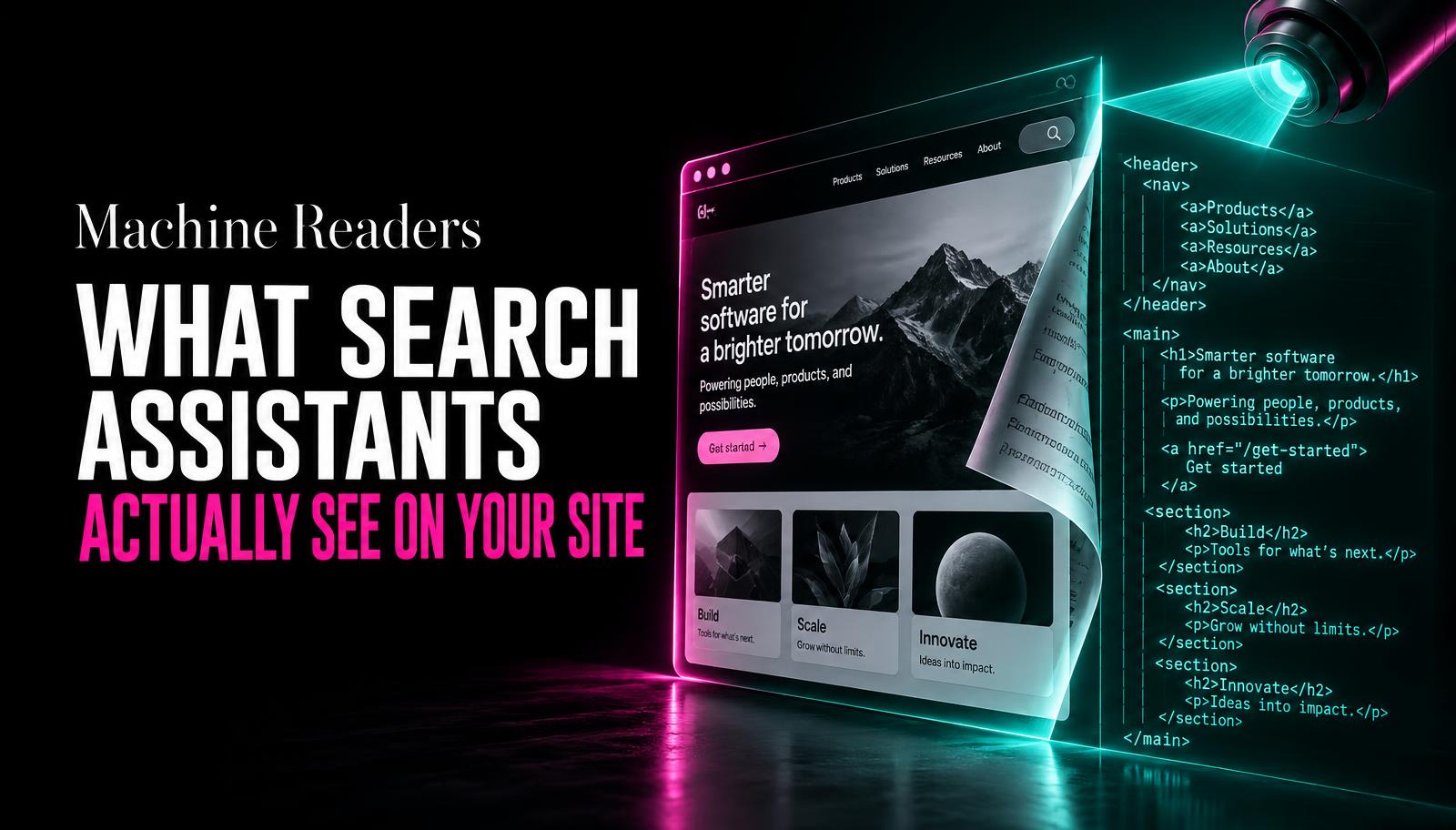
A business owner asked us recently why their beautifully designed homepage never seems to come up when customers ask ChatGPT for a recommendation in their category. The honest answer is that the design was never the problem. It was what the design was hiding. Search assistants read your site closer to how a screen reader does than how a human eye does. They care about words, structure, and clarity. Everything else is invisible to them.
They read text, not vibes
A gorgeous hero image with your tagline baked into the graphic reads as nothing to most of these tools. If your value proposition only exists as text inside an image, it does not exist as far as a language model crawling your page is concerned. The same goes for text hidden inside carousels, tabs that require a click to reveal, or animations that fade text in after a delay. If a tool has to wait or click to see something, there is a real chance it never does.
This does not mean your site needs to look like a plain document. It means the actual words that describe what you do, who you serve, and why someone should choose you need to exist as real, readable text on the page, ideally near the top, not buried three scrolls down or locked inside a graphic.
Headings are doing more work than you think
A page with a clear heading structure, one H1 stating what the page is about, H2s breaking it into logical sections, is far easier for a search assistant to parse and summarize accurately. Headings act like a table of contents these tools use to understand what a page covers before deciding whether to quote it. A page that dumps everything into a single unbroken paragraph gives the tool very little to work with, even if the content itself is good.
This matters even more for FAQ-style content. A direct question as a heading, followed by a direct answer in the first sentence or two beneath it, is close to the ideal format for getting quoted. These tools are frequently looking for a clean question-and-answer pair they can lift and attribute to your page.
If a person has to click three times to find your answer, a search assistant probably never found it at all.
Consistency builds the trust these tools rely on
Search assistants weigh how consistent your information is across the places they can see it: your website, your Google Business listing, review platforms, and directories. If your hours, address, or service list contradict each other across these sources, it creates doubt that pushes a tool toward citing a competitor whose information lines up cleanly everywhere. This is unglamorous work, but going through your listings once a quarter to check for mismatches pays off more than most people expect.
The same applies to your own site. If your homepage says you serve three cities and your services page says five, that is a small inconsistency to a human reader but a real signal of unreliability to a tool trying to summarize you accurately.
| What helps | What gets ignored |
|---|---|
Clear H1/H2 structure with direct answers | Text baked into images or graphics |
FAQ sections with direct question-answer pairs | Content hidden behind clicks, tabs, or hovers |
Consistent business details across the web | Contradicting hours, prices, or service areas |
Structured data (schema markup) on key pages | Decorative animations with no text equivalent |
Plain, specific language about what you do | Vague brand language with no concrete detail |
Structured data is worth the small effort
Schema markup, the behind-the-scenes code that labels your business name, hours, address, and services in a standard format, is one of the few technical fixes that genuinely moves the needle here. It does not change how your site looks to a visitor at all. It just makes the facts about your business unambiguous to anything crawling the page, including search assistants that lean on this data to answer questions confidently.
You do not need to understand the code to benefit from it. Most website platforms have a plugin or built-in setting for this, and it is usually a one-time setup rather than ongoing work. If your site does not have this in place, it is one of the highest-value small fixes available.
A quick self-check for your own site
- Turn off images mentally and reread your homepage
If the core message disappears without images, that message likely isn't visible to search tools either.
- Check your heading structure
Does each page have one clear H1 and logical H2s, or is it one long block of text?
- Search your business details across five places
Compare hours, address, and services on your site, Google Business, and two directories for mismatches.
- Ask a search assistant about your own business
Try ChatGPT or Perplexity with a question a customer might ask. See what it says and where it seems to be pulling from.
- Add or check schema markup on your key pages
Confirm your business info is marked up in a standard, structured format most platforms support natively.
Tap a number to check it off.
What this means for how you write, not just what
Beyond structure, the actual sentences matter. Search assistants tend to favor direct, declarative writing over hedged marketing language. A sentence like "We offer a range of solutions tailored to your unique needs" gives a language model nothing concrete to extract. A sentence like "We replace residential water heaters in under three hours, starting at $450" gives it an exact fact to quote. The more specific and checkable your claims are, the more usable they become to a tool trying to answer a real question accurately.
This is also good writing advice independent of any tool reading your site. Specific claims build trust with human visitors too. The overlap between writing that helps a search assistant and writing that helps an actual customer is much larger than most businesses assume, which is a relief, because it means you are not writing two different versions of your site, just one clearer one.
One clear page beats one page that tries to cover everything
A single page attempting to answer twelve different customer questions tends to answer all of them shallowly. A search assistant summarizing that page will often grab the most generic sentence rather than the specific, useful one, because there is no clear signal about which part matters most. Splitting content into focused pages, each built around one real question a customer asks, gives these tools a much cleaner unit to quote from.
This is not about producing more content for its own sake. It is about matching the shape of your content to the shape of the questions people actually type or speak into these tools. A plumber's site with a dedicated page answering "how much does a water heater replacement cost" will get cited on that exact question far more reliably than a general services page that mentions water heaters in passing.
Usually not. Most fixes are about content structure and clarity, not visual redesign. A few technical additions like schema markup help too.
No, it builds on it. Clean structure and accurate information help both traditional search rankings and AI-driven answers at the same time.
Ask the tools directly with questions your customers would ask, and note whether your business, or a competitor's, comes up and why.